The current state of children’s toys and cartoons really bothers me. Maybe its because of my age and the fact that, I myself have started thinking about having kids. But whatever the reason is that has brought on this train of though, the idea of exposing my own offspring or any children to the current state of toys and cartoons that are at the store and on TV right now makes me sick to my stomach. I have talked about this in the past.
Being a child of the eighties, I grew up and felt privileged to be exposed to what I think are some pretty awesome toys and cartoons. Some of them just off the top of my head are…
I have some really good childhood memories of watching these cartoons and playing with these toys. Toys and cartoons that, to this day, I still enjoy and collect. I am really looking forward to the day that my children and I can enjoy them together.
When I turn on the TV nowadays, I am embarrassed by the cartoons (which all seem to be computer animated now and not hand drawn) that networks broadcast to children. What the hell is Sponge Bob Square Pants anyway? I don’t even recognize the Transformers anymore and their toys just look scary to me.
I am going to go on a Transformers side rant here. So bare with me.
Anyone who has been following my blog knows that I am a die hard, old school, Transformers fan. (TILL ALL ARE ONE!) Something about that cartoon and the toys just clicked with me on an emotional level when I was growing up and I think that is why I am such a fan of them to this day. It might be because it was one of the first toys my older brother ever got me. It might be because when you see an old school Transformer cartoon or toy transforming it makes sense. Just by looking at the thing you can get an idea of which pieces need to move where and when to transform it. I never needed an instruction booklet to transform a Transformer. Because of that the toys made me feel smart. Like I was teaching myself and learning something at the same time. But nowadays you open up one of these “newer” Transformers toys or watch one of the movies or cartoons your head just hurts. Nothing about it makes sense.
Whenever I go to the store, I always check out the toy sections (because I am a kid at heart) and I am applied by what I see. Isles of action figures that don’t look fun or easy to play with. I have also noticed that they have not moved from their shelf from one week to the next. No one is buying this crap. I find myself spending the most time looking at Hot Wheels toys because they are about the only thing in the toy section of stores that I used to play with when I was a kid.
One of the few stores that still carries old school Transformers products is Hot Topic. Whenever I travel down south from Alaska, I make time to go into a Hot Topic and I ask the clerk every time “Do you sell more old school Transformers Products or the newer Transformers Products. Each time for years the answer has been the same “Oh we sell way more old school Transformers. It’s hard for us to keep them in stock.”
Now if that is not telling about the current state of Cartoons and Toys I don’t know what is. I have also noticed this with Transformer cartoon DVDs. The local stores can’t keep the old school stuff on the shelves, but every week, I still see the same new school DVDs on the self right where they where last time. I said it before and I will say it again. No one is buying this crap.
Even Legos have changed over the years. How the hell do you screw up interlocking plastic bricks? Well somehow they did to the point where they are not recognizable anymore. It used to be that kids had buckets of legos from which they could build anything they could imagine.
- Cities
- Planes
- Spaceships
- Cars
- Trucks
- Boats
Now you buy sets to build Hogwarts, or some Star Wars space ship and that is it. You want to build anything else? Well, you’ll have to buy a different Lego kit. WTF?
My mom is currently visiting my wife and I and I was talking to her about the current state of cartoons. She had a brilliant insight which was that cartoons these days are one of the reasons why kids are failing in school (besides the fact that the current educational system sucks). She said it is because cartoons are killing children’s attention span. Eight minutes into a show and BAM, commercial. Kids can’t focus in class because there attention span only lasts eight minutes. I can’t help but think there must be some truth in that statement.
One of the reasons why I collect TV shows and Cartoons on DVDs is so I don’t have to watch commercials. The idea that my doing this might be improving my future child’s attention span made me happy.
What do you think of cartoons now a days? For that matter; What do you think of toys now a days? What is or was your favorite cartoon and toy growing up?
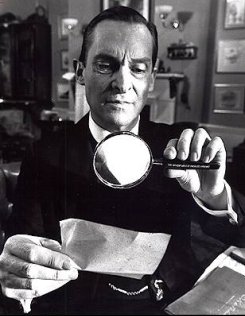 When I was still in high school I read all of the Sherlock Homes Adventures by Sir Arthur Conan Doyle. Something about the way Sherlock Homes could solve problems and see things others couldn’t always interested me. I say this about my brothers a lot but, I love how Sherlock’s thinks, how his mind works. I wish my mind fired as fast as theirs.
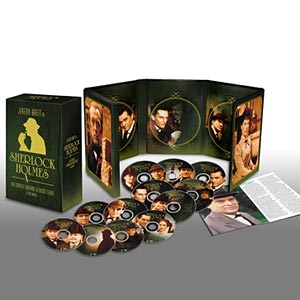 Not long after I finished reading all the Homes books I found The Adventures of Sherlock Holmes tv series on the A&E Network. My mom and brother would sit with me and watch it. I don’t know why, but not long after I moved to Juneau I started poking around the internet looking for the DVD’s of this great show. I was able to find a few disks on Amazon.com, but never the complete series. Then a couple of years ago I found myself walking through the DVD section of Costco when I spotted Sherlock Home: The Complete Granada Television Series. I picked it up, No questions asked.